Clean a whole list. Pay only for real answers.
Upload a CSV or Excel file and BounceOwl checks every unique address live. You see the cost before it starts, and every credit not used for a real answer comes back when it finishes.
100 free credits with Google sign-in. Unknown results are always free.
How it works
- 1
Upload your file
CSV, TXT or XLSX up to 50 MB and 500,000 rows. We find the email column and fold duplicates, so each address is checked once.
- 2
See the cost, then start
The estimate covers unique, valid-looking addresses only. Short on credits? Top up, or check just the first rows you can afford.
- 3
Download the results
Get your original columns plus the verdict, reason, mail server and flags. Filter to valid, bounce, catch-all or unknown.
Built so you don't overpay
- Duplicates charged once
- Upper and lower case versions of the same address count as one. Empty rows are skipped.
- Refunds are automatic
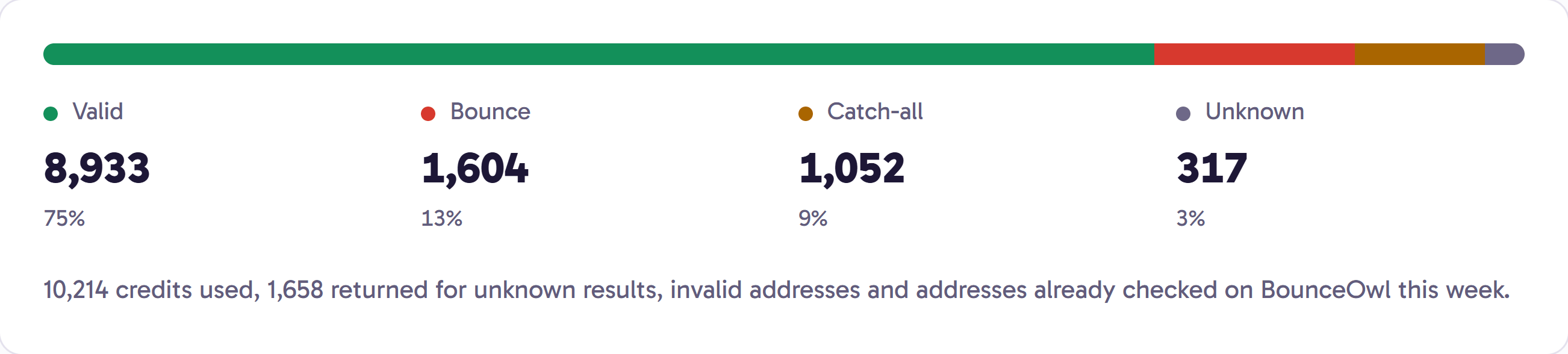
- Credits are reserved when the list starts. Unknown results, invalid addresses and addresses checked on BounceOwl this week come back at the end.
- Catch-alls handled separately
- When the list finishes, run the catch-all check on just the catch-all rows, from the same page.
- Your file is deleted
- Uploaded files and their extra columns are deleted after 30 days. The results stay in your history.
Questions
What file formats can I upload?
CSV, TXT and Excel (.xlsx), up to 50 MB and 500,000 rows per list. A header row helps but isn't required.
Can I try it with a sample?
Yes. Download the sample CSV in the app. It uses addresses that accept no mail, so checking it is free.
What if I don't have enough credits?
The list page shows how many more you need. Add credits, or start with only the first rows your balance covers.
Can I check a list from code?
Yes. Upload with POST /v1/bulk, start it, poll the status and download the results with the API.
Check your next list before it costs you a domain.
100 free credits with Google sign-in. Pay as you go after that, and credits never expire.