Gmail, Yahoo and Outlook sender rules in 2026: what bulk senders must do
The bulk sender rules from Gmail, Yahoo and Outlook.com, taken from each provider's own pages: who they apply to, what to set up, and what happens if you don't.
BounceOwl team5 min read
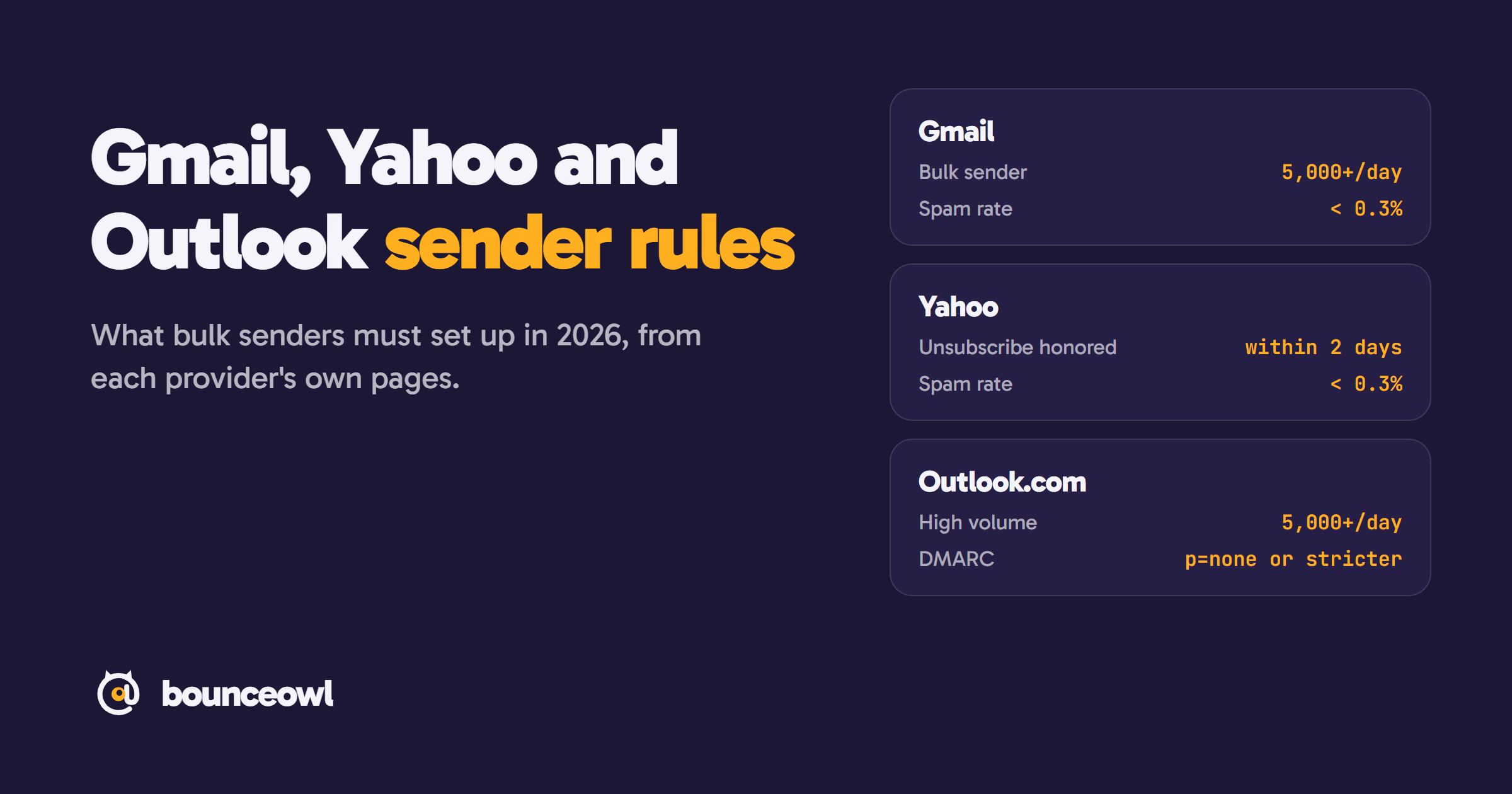
Gmail, Yahoo and Outlook.com require senders to authenticate their mail and keep spam complaints low. Bulk senders, around 5,000 messages a day, must pass SPF and DKIM and publish DMARC at p=none or stricter, aligned with the From domain. Gmail and Yahoo also require one-click unsubscribe for marketing mail and a spam rate below 0.3%.
Gmail and Yahoo started enforcing their sender rules in February 2024. Outlook.com followed on May 5, 2025. Since then, most guides have copied each other, and a few details drifted along the way. This one sticks to what each provider says on its own pages, checked in November 2026, with a link to every source.
Who counts as a bulk sender
- Gmail: "any email sender that sends close to 5,000 messages or more to personal Gmail accounts within a 24-hour period." Mail from the same primary domain counts together, and once you hit it, you are a bulk sender for good. The rules cover personal Gmail addresses (@gmail.com and @googlemail.com), not Google Workspace accounts. (Gmail sender FAQ)
- Yahoo: has separate requirements for bulk senders but doesn't publish a number. (Yahoo Sender Hub)
- Outlook.com: "domains sending more than 5,000 emails per day" to Outlook.com, Hotmail.com and Live.com addresses. (Microsoft announcement)
If you send cold email from a few mailboxes, you are probably under every threshold. The rules for all senders below still apply to you.
Rules for every sender, even small ones
Gmail requires every sender to set up SPF or DKIM, have valid forward and reverse DNS (PTR) records for sending IPs, use TLS, keep the spam rate in Postmaster Tools below 0.3%, and format messages to RFC 5322. (Gmail sender guidelines)
Yahoo's list for all senders is almost the same: SPF or DKIM, a spam rate below 0.3%, valid forward and reverse DNS, and compliance with RFCs 5321 and 5322. (Yahoo Sender Hub)
If you send through Google Workspace, Microsoft 365 or a reputable email platform, TLS and reverse DNS are handled for you. SPF and DKIM are on you: they are DNS records for your own domain.
Extra rules for bulk senders, side by side
| Rule | Gmail | Yahoo | Outlook.com |
|---|---|---|---|
| Who it applies to | Close to 5,000+ messages a day to personal Gmail accounts | Bulk senders (no number published) | Domains sending more than 5,000 emails a day |
| SPF and DKIM | Both | Both | Both must pass |
| DMARC | At least p=none, From aligned with SPF or DKIM | At least p=none, must pass, relaxed alignment is fine | At least p=none, aligned with SPF or DKIM (preferably both) |
| One-click unsubscribe | Required for marketing and subscribed mail, plus a visible link | Required for marketing and subscribed mail, plus a visible link | Clear, visible opt-out (best practice) |
| Honor unsubscribes | Within 48 hours | Within 2 days | No time given |
| Spam complaint rate | Below 0.1%, never 0.3% or higher | Below 0.3% | No number published |
| Enforcing since | February 2024, stricter from November 2025 | February 2024 | May 5, 2025 |
Two details are worth knowing. Gmail requires a DKIM key of at least 1024 bits and recommends 2048. And Gmail's mailto unsubscribe links still work but "don't meet our one-click unsubscribe requirement": you need the List-Unsubscribe-Post: List-Unsubscribe=One-Click header with an HTTPS link. (Gmail, Gmail FAQ)
The spam rate is the number to watch
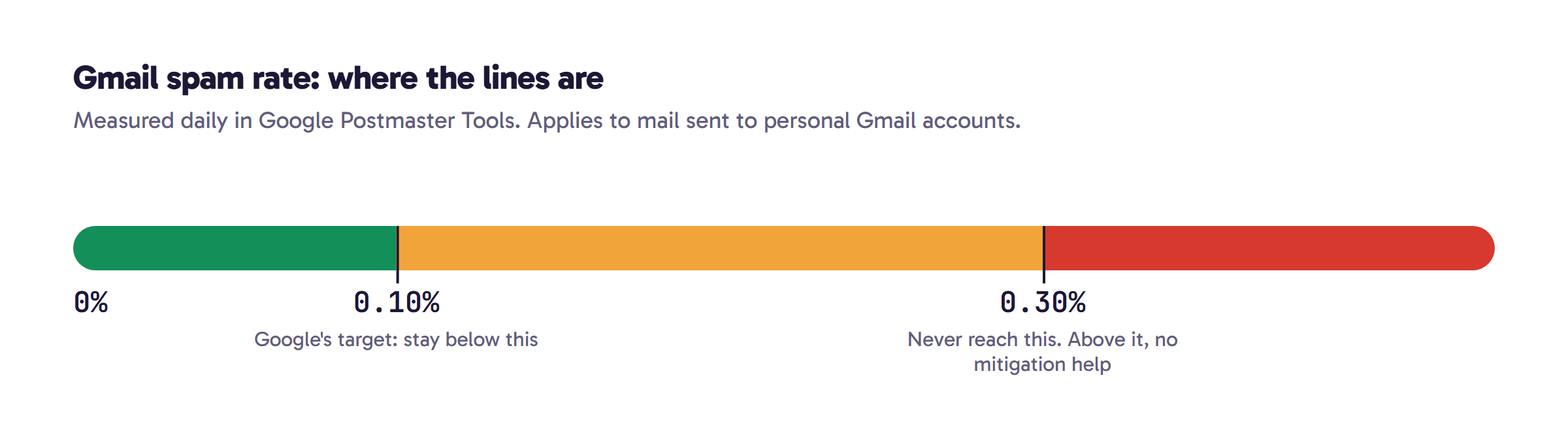
Gmail calculates the spam rate daily in Postmaster Tools. Google's guidance: "Keep spam rates reported in Postmaster Tools below 0.10% and avoid ever reaching a spam rate of 0.30% or higher." Above 0.3%, bulk senders can't get mitigation help, and they become eligible again only after 7 days in a row below 0.3%. (Gmail FAQ)
Yahoo measures complaints through its Complaint Feedback Loop and asks bulk senders to stay below 0.3%.
What happens if you don't comply
Gmail says it is "ramping up its enforcement" from November 2025: "Messages that fail to meet the email sender requirements will experience disruptions, including temporary and permanent rejections." Authentication problems lead to temporary or permanent error codes, or the spam folder. A spam rate above 0.3%, a missing DMARC record or missing one-click unsubscribe takes away mitigation support. (Gmail FAQ)
Yahoo only says non-compliance will have "a negative impact to the delivery of your mail." (Yahoo Sender Hub)
Outlook.com: Microsoft's announcement, last updated April 30, 2025, says non-compliant high-volume mail goes to the Junk folder after May 5, 2025, and that rejection will follow at a date "to be announced" with the error 550; 5.7.515 Access denied, sending domain [SendingDomain] does not meet the required authentication level. Senders in the comments under that post report already getting this error, so plan for rejection rather than Junk. (Microsoft announcement)
What all three say about bad addresses
None of the three publishes a bounce-rate limit. All three tell you to stop sending to addresses that don't work:
- Google: "Automatically unsubscribe recipients who have multiple bounced messages." And: "If messages start bouncing or start being deferred, reduce the sending volume until the SMTP error rate decreases." (source)
- Yahoo: "Remove invalid recipients from your list promptly" and "Monitor hard and soft bounces as well as inactive recipients." (source)
- Microsoft: "Remove invalid addresses regularly to reduce spam complaints, bounces, and wasted messages," ideally "monthly or quarterly." (source)
The cheapest way to follow that advice is to catch bad addresses before the first send. Bounces you never cause never show up in your SMTP error rate. A verifier checks each address against its mail server without sending anything, so you can drop invalid ones and treat catch-all ones with care.
A checklist you can run this week
- Publish an SPF record and sign mail with DKIM, using a 2048-bit key if your provider supports it.
- Publish DMARC with at least
p=noneand aruaaddress so you get reports. Make sure your From domain aligns with SPF or DKIM. - For marketing mail, add both one-click unsubscribe headers and a visible link, and remove people within 2 days.
- Register your domain in Google Postmaster Tools and Yahoo's Complaint Feedback Loop, then watch the spam rate weekly.
- Verify every list before you send to it, and suppress any address that hard-bounces.
To see which mail servers and provider a domain uses, try the free MX lookup. To check one address, use the free email checker. For a whole list, upload it here: the first 100 checks are free.
FAQ
Do these sender rules apply to cold email?
Yes. They apply to everyone sending to these providers. Cold email from a few mailboxes is usually below the bulk threshold, but the rules for all senders still apply.
Does Gmail count the 5,000 messages per mailbox or per domain?
Per domain. Gmail counts all mail from the same primary domain together, and once you cross the threshold you stay a bulk sender.
What spam complaint rate should I aim for?
Below 0.1% in Google Postmaster Tools, and never 0.3% or higher. Yahoo asks bulk senders to stay below 0.3%.
What does the Outlook error 550 5.7.515 mean?
Outlook.com rejected your mail because your domain failed its authentication check. Our guide to fixing 550 5.7.515 walks through the SPF, DKIM and DMARC steps.
Sources
Check a list before you send it.
Live checks with evidence. Unknown results are free, and credits never expire.
Start with 100 free creditsKeep reading
Deliverability3 min read
Hard bounce vs soft bounce: what's the difference and what to do
Hard bounce vs soft bounce explained: 5xx vs 4xx SMTP codes, common causes like 550 5.1.1 and greylisting, and when to remove an address.
Deliverability4 min read
550 5.7.515 Access denied: what it means and how to fix it
Fix the Outlook 550 5.7.515 Access denied error: what it means, why Microsoft rejects your domain, and step-by-step SPF, DKIM and DMARC setup.
Guides4 min read
How to check if an email ID is valid (free, without sending an email)
Check if an email ID is valid or real for free, without sending an email. Four methods, what each result means, and tips for Gmail and company emails.